


ArtView II/360 - canvas widths from 370mm to 639mm
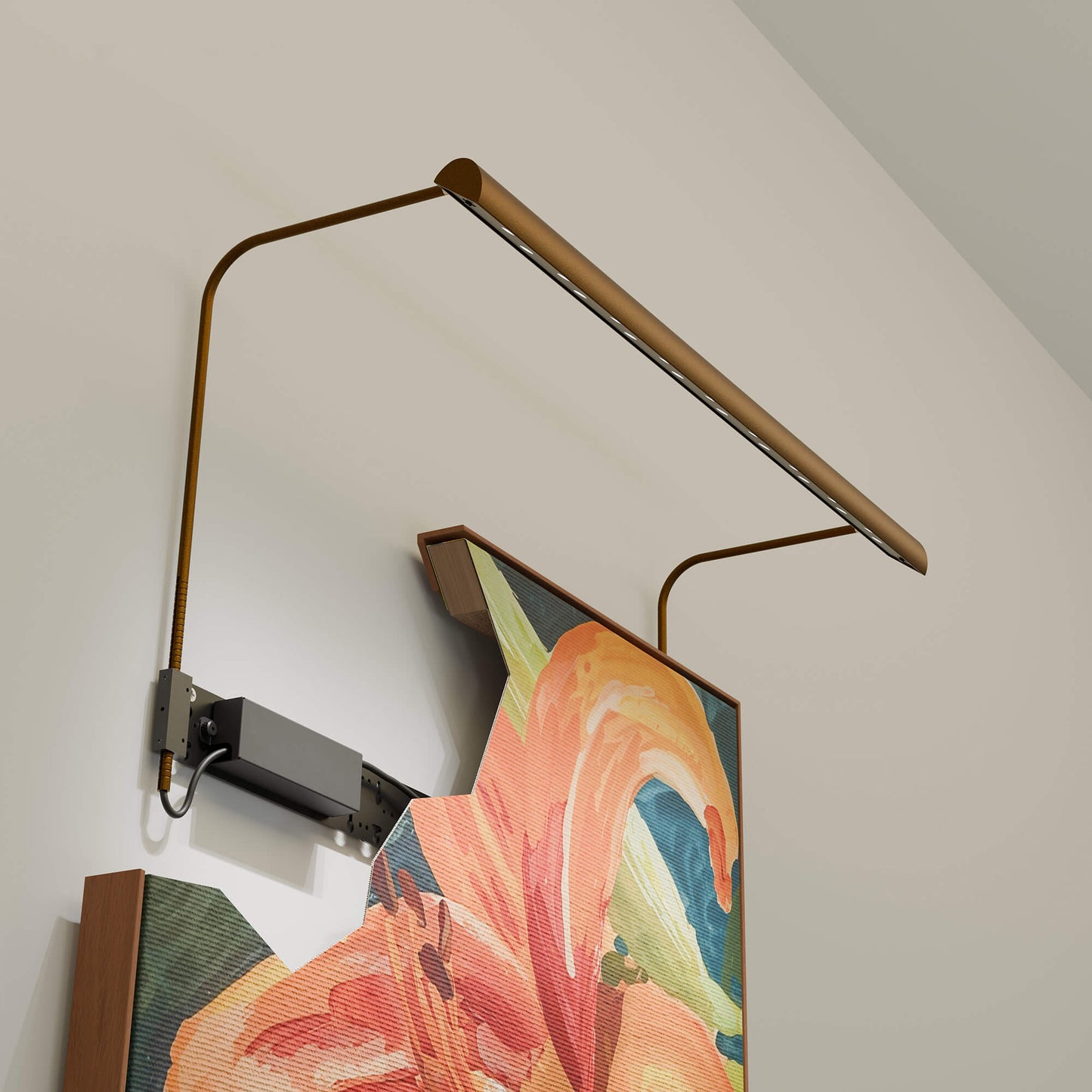
ArtView II is a specialist picture light specifically designed for lighting fine artwork. Building on the success of the original ArtView picture light, it addresses the issues associated with traditional picture lights: uneven light coverage, poor quality light, high energy consumption and harmful UV emissions, whilst looking perfectly in keeping with both traditional and modern interiors. ArtView II uses high-spec LED chips and features an innovative system of optics and filters to allow fine-tuning for each fitting to a canvas’ size, material and tones. The result is glorious, consistent light, accurate colour rendering, and beautifully lit artwork.
Product Info
The idea
Paintings seen in their best light
The ArtView II was born out of the need to light fine artwork better.
ArtView II is a highly configurable and flexible solution for lighting canvases across a wide range of sizes, with exceptionally even coverage and light quality.
We offer ArtView II in different lengths to light pictures up to 2100mm wide and 2100mm tall as ‘standard.’ It is also possible to light wider or taller artwork using a custom specification.
The 360mm length ArtView II is designed to light a canvas width of 370mm - 639mm, with a canvas height from 500mm up to 2100mm as standard.
All ArtView II picture lights are configurable to enable the best possible coverage without over-lighting the painting. Configurable options include the bar length, number of LED rows, beam angles, arm depth and independent dimming of different optic types.
The images below illustrate a representative configuration of this size picture light on a representative size canvas, with the specification and light output fine tuned to deliver a max of c.200 lux on to the canvas. Lux is a measure of the amount of light falling on a surface. The picture light output can be adjusted to deliver more or less light than this, depending on your particular requirements, but 200 lux is the maximum recommended for oil paintings in museums and galleries.
Photometric (light modelling) software is remarkably unforgiving – it’s much more ‘stark’ than viewing a real canvas in real life when your eye is drawn to the focal point of a painting – but even the unforgiving software shows just how even the light distribution is.
As part of the installation instructions, we will provide specific recommendations on how best to light your artwork.

Photometric data for a 500mm × 750mm canvas.
A unique feature of the ArtView II is that while we design the ideal specification around your specific artwork, we can adjust some characteristics of the picture light if you choose to use it on another piece of art. This is a long-term investment.
Designed and manufactured in the UK, the ArtView II range has been designed for easy maintenance and long-term servicing. It has a five year warranty and also benefits from the manufacturer's 25-year Duty of Care.
Technical reference
Technical Information
The sections below explain the options above in more detail, including installation requirements, dimensions and configuration choices. Click any heading to expand it.
Cabling requirements
The ArtView II/360 needs two drivers as it has a double row of LEDs. Each driver requires a 230V switched live and neutral supply. The drivers can be mounted behind the picture or up to 15m away from the picture.
For ArtView II models with two rows of LEDs and two drivers, we recommend an 8-core cable from the driver to the picture itself.
8-core cable provides:
- 2 x LED circuit
- 2 x onboard dimming control
Dimming is ideally located on the picture light head. However, dimming can also be installed remotely. If dimming is remote, the number of cores required can be reduced by 2 or 4 cores, depending on the picture light specification.
LED rows
The ArtView II/360 comes with two rows of LEDs. The number of rows is driven by the height of your artwork.
- For artwork between 500mm and 2100mm in height use the double LED row model

LED colour temperature
The ArtView II is available in 2700K (very warm white) or 3000K (warm white) colour temperatures. All versions have an excellent colour rendering: CRI of 97.4 and TM30 of 95.7 (measured at 3000K).
Finish options
Available in powder coated paint finishes Dryac 34 matt bronze, matt black, RAL9010 pure white and hand applied aged brasss paint finish Grosvenor brass.
Note: Custom finishes are available, as a guide a custom powder coat finish will add 10-20% to the overall cost. Hand finished metallic finishes are also available. Contact us for more details.
Arm depth
The height of your artwork guides your arm depth. For the ArtView II/360, these are the suggested arm depths based on the height of your artwork.
- For paintings from 500mm to 749mm in height, use the 250mm arm.
- For paintings up to 1749mm in height, use the 300mm arm.
- For paintings up to 2100mm in height, use the 400mm arm.

We can offer custom arms if you need something different from the standard range for example a different height, depth, angle or fixing point e.g ceiling fixing. Talk to us here.
Arm height & head tilt adjustment
The ArtView II is designed for toolless and effortless height adjustment allowing fine-tuning without disturbing the artwork or fixing points. The head tilt adjustment allows you to control the gradient of light with minimal glare and no distracting beam artefacts.
Fixing methods
The ArtView II has two fixing methods, either a bracing bar or fixing brackets. The preferred fixing method will depend on what your wall is like, and/or if you are fixing to the frame instead.
Bracing bar
If you are fixing to the wall and the wall has a flat surface, we recommend the bracing bar. It has multiple potential fixing points and it's easy to adjust the height of the bar above the artwork.
The bracing bar can also enable an integral driver housing option, which means that the driver is mounted within a metal casing on to the bracing bar (as opposed to elsewhere behind the picture, or remotely.) NB. Please see driver location information for more information around this.

Fixing brackets
If you are mounting to the frame or to an uneven wall surface, we recommend using the fixing brackets. It's a more forgiving mounting solution for difficult walls.
Drivers can still be located behind the painting but just not mounted on to the (not present) bracing bar.

Driver location
The ArtView II requires LED driver(s) to operate the picture light. Drivers can be installed in one of the following locations:
- Mounted behind the artwork (off the fixing/bracing bar)
- Mounted remotely from the artwork, up to 15m away
Picture light dimming is controlled at the picture light head.
Drivers sit behind the artwork

The driver requires a 230V switched live and neutral supply behind the artwork. This option is applicable for both the bracing bar and the fixing brackets. The driver is either mounted to the wall or tucked within the frame of the canvas. This route needs a minimum of 40mm behind the artwork to be viable.
0-10V driver dimensions: L:160mm x W:42mm x H:31mm
N.B. More than one driver might be needed. Two rows of LEDs require two drivers.
Drivers sit remote from the artwork (driver not shown)

The driver requires a 230V switched live and neutral supply to the remote driver location from there take a 4 or 8 core cable to the artwork depending on picture light specification. This option is applicable for both the bracing bar and the fixing brackets. The driver must be within 15m of the picture light.
Dimming options
There are three potential options for dimming the ArtView II.
- Onboard dimming with the potentiometer on the head of the picture light
- Remote dimming with the potentiometer next to the driver
- Dimming with a control system

The picture lights are dimmed with potentiometers. The integrated onboard potentiometer can be adjusted with a small screwdriver and then switched at the wall. This method can be used with drivers housed behind the artwork or housed remotely. We recommend the onboard dimming method for onboard/behind the artwork or remote drivers.
If the driver is remote from the picture, we can supply a potentiometer to be fixed close to the driver. Again, the fitting will be switched at the wall.
Contact us if you're planning to dim the fittings with a control system such as Lutron, Crestron or Control4. We can advise on the best cabling architecture for your system.

For more help
Let us help specify the right ArtView II
Tell us about your artwork, dimensions and installation. We’ll help check the specification and confirm the best option.
Open the specification form →

Related products
-
 ProductsArtView II/Mono - canvas widths up to 329mmRegular price Sale price £498.00
 -
 ProductsArtView II/320 - canvas widths from 330mm to 599mmRegular price Sale price £667.20
 -
ProductsArtView II/590 - canvas widths from 600mm to 909mmRegular price Sale price £734.40
-
ProductsArtView II/630 - canvas widths from 640mm to 909mmRegular price Sale price £892.80
-
ProductsArtView II/900 - canvas widths from 910mm to 1179mmRegular price Sale price £769.20
-
ProductsArtView II/1170 - canvas widths from 1180mm to 1449mmRegular price Sale price £844.80
-
ProductsArtView II/1440 - canvas widths from 1450mm to 1719mmRegular price Sale price £979.20
-
ProductsArtView II/1710 - canvas widths from 1720mm to 2100mmRegular price Sale price £1,076.40

